Practice SQL Queries On Having Clause
Having Cluse In SQL Queries
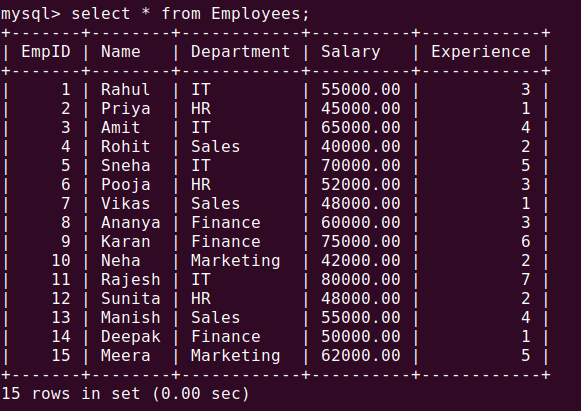
Practice SQL Queries On Having Clause
Having Cluse In SQL Queries , Oct-10-2026
Practice Question 1: Filtering by Average Salary
Problem Statement:
Write a SQL query to find departments where the average salary is strictly greater than 55,000. Display the department name and its average salary.
Solution
SQL
SELECT Department, AVG(Salary) AS AvgSalaryFROM EmployeesGROUP BY DepartmentHAVING AVG(Salary) > 55000;
Explanation
GROUP BY Department: Groups the rows in the table by each unique department (IT,HR,Sales,Finance,Marketing).AVG(Salary): Calculates the average salary for each of those department groups.HAVING AVG(Salary) > 55000: Filters the grouped results, keeping only the departments where the calculated average meets the condition. (WHEREcannot be used here becauseWHEREfilters individual rows before grouping takes place).
Practice Question 2: Finding Large Teams (Counting Grouped Rows)
Problem Statement:
Write a SQL query to find departments that have more than 3 employees. Display the department name and the total employee count.
Solution
SQL
SELECT Department, COUNT(*) AS EmployeeCountFROM EmployeesGROUP BY DepartmentHAVING COUNT(*) > 3;
Explanation
COUNT(*): Counts how many employee rows belong to each department group.HAVING COUNT(*) > 3: Ensures that only departments with a headcount greater than 3 are returned in the final output. For instance, ifHRhas 3 employees andIThas 4,HRwill be filtered out.
Practice Question 3: Combining WHERE and HAVING
Problem Statement:
Write a SQL query to find departments where the average salary of employees who have more than 1 year of experience is greater than 60,000. Display the department and that filtered average salary.
Solution
SQL
SELECT Department, AVG(Salary) AS FilteredAvgSalaryFROM EmployeesWHERE Experience > 1GROUP BY DepartmentHAVING AVG(Salary) > 60000;
Explanation
WHERE Experience > 1: This row-level filter runs first, removing any employee with 1 year or less of experience before any grouping happens.GROUP BY Department: Groups the remaining filtered employees by department.HAVING AVG(Salary) > 60000: Filters the groups to only include departments where the average salary of the experienced staff exceeds60,000.
Practice Question 4: Maximum Salary Threshold per Department
Problem Statement:
Write a SQL query to find departments where the maximum salary paid is at least 75,000. Display the department name and the highest salary in that department.
Solution
SQL
SELECT Department, MAX(Salary) AS MaxSalaryFROM EmployeesGROUP BY DepartmentHAVING MAX(Salary) >= 75000;
Explanation
MAX(Salary): Finds the highest salary within each department group.HAVING MAX(Salary) >= 75000: Filters out any department where the peak earner makes less than75,000. Departments like IT or Finance that feature high salaries will appear, while departments with lower top-end pay will be excluded.
We use the HAVING clause because the WHERE clause cannot filter aggregate functions (like SUM, AVG, COUNT, MAX, or MIN). When you group data together, you often need to set a condition on the summary result of those groups rather than on the individual rows. That is exactly what HAVING is designed for. Order of Execution in SQL Understanding the sequence helps clarify why both clauses coexist: FROM: Gathers the raw table data. WHERE: Filters individual rows (e.g., WHERE Experience > 1). GROUP BY: Packs the remaining rows into groups. HAVING: Filters the groups based on aggregate results (e.g., HAVING COUNT(*) > 3). SELECT: Chooses what columns to display. ORDER BY: Sorts the final output.
Popular Keywords
-
Difference Between Where And Having Clause In SQL Queries
-
What Is Group By Clause In SQL Query
-
Where Should We Use Having Clause In SQL
-
What Are Aggregate Functions In SQL
Tags
Difference Between Where And Having Clause In SQL Queries What Is Group By Clause In SQL Query Where Should We Use Having Clause In SQL What Are Aggregate Functions In SQL