Notes-on-chapter-Internet-and-web-IP-class-XII-CBSE
Find all type of short questions fill in the blanks true or false case study for class XII IP Internet and web CBSE 065
Notes-on-chapter-Internet-and-web-IP-class-XII-CBSE
Find all type of short questions fill in the blanks true or false case study for class XII IP Internet and web CBSE 065 , Sep-08-2026
Chapter 5: Internet and Web — Study & Revision Pack
📌 Section 1: Definitions (1-Mark Direct Concepts)
Computer Network: An interconnection among two or more computers or computing devices to share data and resources.
Node (Host): Any device connected to a communication network that can receive, create, store, or send data (e.g., computers, printers, routers).
Ethernet: A set of standardized rules/protocols that determine how computers and devices connect and communicate via cables in a local network.
Modem: A device that converts digital signals into analog signals (Modulation) at the sender's end and analog signals back into digital bits (Demodulation) at the receiver's end.
MAC Address: A unique hardware address assigned to a Network Interface Card (NIC) to uniquely identify a device on a network.
Network Topology: The physical or logical arrangement/layout of computers, cables, and peripherals in a network.
URL (Uniform Resource Locator): A standard naming convention and web address that provides the exact location and access protocol for a resource on the World Wide Web.
Web Server: A computer hardware or software system that stores website files and delivers them to client browsers upon HTTP requests.
Dynamic Web Page: A web page whose content changes dynamically based on user interaction, database updates, or time-specific data.
Cookie: A small text file saved on a user's browser by a website to store preferences, browsing history, and login sessions.
📝 Section 2: Short Notes (2 to 3 Marks)
1. Types of Networks (LAN vs. MAN vs. WAN)
LAN (Local Area Network): Connects devices within a limited distance (up to 1 km) like a room, office building, or campus. Offers high data transfer speeds (10 Mbps to 1000 Mbps).
MAN (Metropolitan Area Network): Covers a larger geographical area such as an entire city or town (extended up to 30–40 km). Example: Cable TV networks.
WAN (Wide Area Network): Spans across cities, countries, or continents. The Internet is the largest example of a WAN.
2. Difference Between Hub and Switch
Hub: A basic networking device that broadcasts incoming data to all connected ports, causing network congestion and data collisions.
Switch: An intelligent device that inspects the destination address of arriving packets and forwards them only to the intended target device, avoiding collisions and filtering noisy/corrupted signals.
3. Router vs. Gateway
Router: Receives, analyzes, and routes data packets between different networks (e.g., LAN to Internet) and can repackage data packets if required by another network.
Gateway: Acts as an entry and exit point ("gate") between an organization's internal network and an external network. It handles protocol conversions and often integrates security firewalls.
4. World Wide Web (WWW) vs. Internet
Internet: The physical, global infrastructure of interconnected computer networks, cables, routers, and devices.
WWW: An information retrieval service operating on top of the Internet consisting of interlinked web pages and digital resources accessed via URLs and HTTP.
5. Static vs. Dynamic Web Pages
Static Web Pages: Written in HTML/CSS/JavaScript with .htm or .html extensions. Content remains identical for every user and requires no server-side processing or database connection.
Dynamic Web Pages: Created using server-side languages (Python, PHP, Java, ASP.NET). Content is retrieved from databases in real-time and generated uniquely for different users or actions (e.g., banking portals, weather sites).
6. Add-ons vs. Plug-ins
Plug-in: A complete, standalone software program installed on the host computer that can be utilized by browsers and other applications (e.g., Adobe Flash Player, Java).
Add-on (Extension): A lightweight module specifically designed to extend or modify functionalities directly within a web browser.
✏️ Section 3: Fill in the Blanks
For communication over a network, data is divided into smaller chunks called packets.
The set of rules that decides how computers connect through cables in a LAN is called Ethernet.
The device that regenerates weakened signals traveling beyond 100 meters is a Repeater.
To build a fully-connected mesh topology of n nodes, n(n - 1) / 2 wires are required.
The hierarchical network arrangement composed of star and bus sub-networks is called Tree (or Hybrid) topology.
Sir Tim Berners-Lee invented the World Wide Web in 1990.
The protocol that securely retrieves linked web pages across the web is HTTPS.
The error code displayed by a web browser when a server cannot locate a requested page is Error 404.
The mapping between domain names and IP addresses on the Internet is managed by DNS (Domain Name System).
Mosaic was the first web browser developed by the NCSA.
🔘 Section 4: True or False
False: A hub transmits data packets selectively only to the destination machine. (Correction: A hub broadcasts data to all connected ports.)
True: Data transfer link in a ring topology is unidirectional.
True: A router can repackage larger data packets into smaller ones if required by the receiving network.
False: In bus topology, if the central node fails, only one device gets disconnected. (Correction: Star topology relies on a central node; in bus topology, a failure in the backbone cable brings down the whole network.)
True: VoIP converts analog voice signals into digital data packets for transmission over broadband lines.
False: HTML is used to perform complex server-side operations and retrieve data from databases. (Correction: HTML designs the basic structure of a web page; server-side languages handle database retrieval.)
True: Modern web routers at home often perform the combined tasks of a router, switch, and modem.
False: Cookies are executable programs that run malware on the user's hard drive. (Correction: Cookies are plain text files stored by browsers to remember settings and user preferences.)
🎓 Section 5: CBSE Board Exam Pattern Questions
Section A: Multiple Choice Questions (1 Mark Each)
Q1. Which device is used to convert digital signals from a computer into analog signals for transmission over telephone lines?
(A) Switch
(B) Repeater
(C) Modem
(D) Gateway
Answer: (C) Modem
Q2. Which topology requires every node to be connected directly to every other node in the network?
(A) Star
(B) Bus
(C) Tree
(D) Mesh
Answer: (D) Mesh
Q3. Which of the following is an application of VoIP technology?
(A) Email
(B) Internet Telephony
(C) Web Hosting
(D) Static Web Page
Answer: (B) Internet Telephony
Q4. What is the full form of URL?
(A) Unified Resource Locator
(B) Uniform Resource Locator
(C) Universal Resource Link
(D) Uniform Real-time Link
Answer: (B) Uniform Resource Locator
Section B: Short Answer Questions (2 Marks Each)
Q5. What is an e-mail attachment? Mention one advantage of using attachments.
Answer:
An email attachment is a pre-existing file (text document, image, audio, or video) stored on secondary storage that is sent alongside an email message.
Advantage: It eliminates the need to retype or recreate existing document content inside the mail body, allowing quick file transfer across the globe.
Q6. Define VoIP. Mention one advantage and one disadvantage of using VoIP services.
Answer:
VoIP (Voice over Internet Protocol) is a technology that allows voice calls (telephone calls) to be transmitted over digital IP networks/Internet instead of traditional telephone networks.
Advantage: Highly economical or free, enabling low-cost international calling.
Disadvantage: Call quality depends entirely on Internet speed; a slow connection causes poor voice quality.
Section C: Case/Application Based Question (3 Marks)
Q7. Joe opened his web browser and typed [http://www.ncert.nic.in/textbook/textbook.htm](http://www.ncert.nic.in/textbook/textbook.htm).
(a) Identify the protocol and the domain name from the above URL.
(b) Joe encountered an Error 404 screen. What does this error signify?
Answer:
(a)
Protocol: http (or HyperText Transfer Protocol)
Domain Name: ncert.nic.in
(b) Error 404: Signifies that the requested web page could not be located on the web server (either the file was moved/deleted or the web address/file path was typed incorrectly).
Section E: Case-Study / Comprehensive Network Installation (5 Marks)
Q8. ABC Pvt. Ltd. is setting up a new campus with four main wings: Administration, Sales, Development, and Support.
Distances:
Admin to Sales: 60 m
Admin to Development: 90 m
Admin to Support: 120 m
Sales to Support: 70 m
Development to Support: 45 m
Number of Computers:
Admin: 120
Sales: 40
Development: 70
Support: 25
(i) Suggest the most suitable wing to place the Server. Justify your answer.
(ii) Suggest a suitable cable layout to connect all four wings efficiently.
(iii) Which hardware device should be installed inside each wing to connect all local computers together?
(iv) If the company wants to connect this office in Mumbai with their regional office in Jaipur (1400 km away), which type of network (LAN, MAN, WAN) will be formed?
(v) Signals weaken when transmitted from Admin to Support (120 m). Which device should be installed to regenerate signals?
Answer:
(i) Server Location: Administration Wing, because it contains the maximum number of computers (120 machines), following the 80/20 rule to minimize network traffic.
(ii) Cable Layout: Star Topology connecting Admin to all other wings:
Admin → Sales (60 m)
Admin → Development (90 m)
Admin → Support (120 m)
(iii) Hardware Device: Switch (or Hub) in each wing.
(iv) Network Type: WAN (Wide Area Network).
(v) Signal Regeneration Device: Repeater (since the distance exceeds 100 meters).
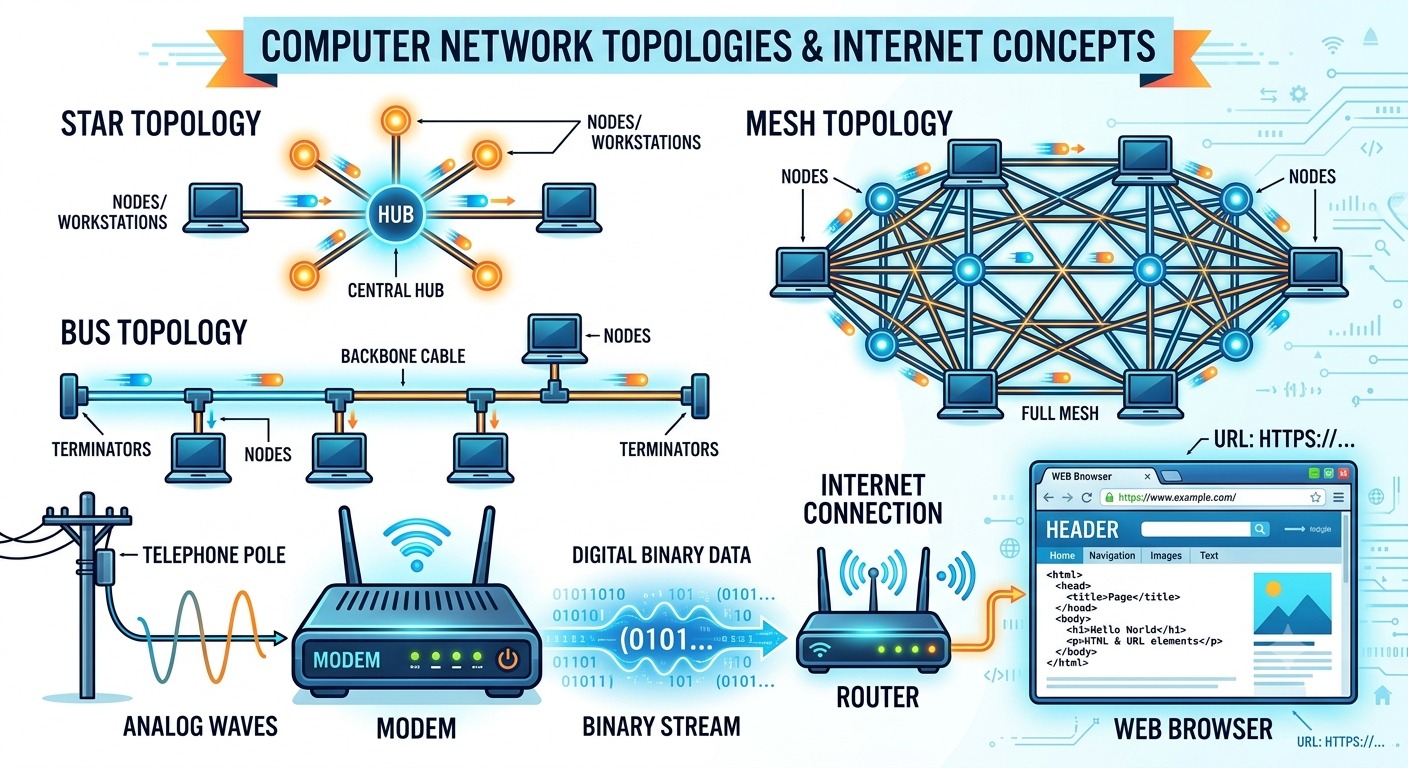
Internet and Web introduces the foundational concepts of modern computer networks, their architecture, and web technologies. It covers the physical and logical components that enable global communication, detailing network types (LAN, MAN, WAN), network topologies (Bus, Star, Tree, Mesh), and key hardware devices like modems, hubs, switches, routers, and gateways. Additionally, the chapter explores the structure and mechanics of the World Wide Web. It explains how digital content is accessed and transmitted using protocols like HTTP/HTTPS, IP and MAC addressing schemes, and the Domain Name System (DNS). Key web concepts including static versus dynamic web pages, browser functionalities (cookies, add-ons, and plug-ins), and real-time communication technologies like Voice over IP (VoIP) are also highlighted to give students a practical understanding of how internet services operate.
Popular
- Class XII IP CBSE Code 065
- Chapter 5 IP Class XII
- Notes On Internet & Web
- Internet & Web
Shopeze.in
Boost via Reels & Images
Learn Python By Gagan Khanna
Professional Help for Growth
Tags
Class XII IP CBSE Code 065 Chapter 5 IP Class XII Notes On Internet & Web Internet & Web